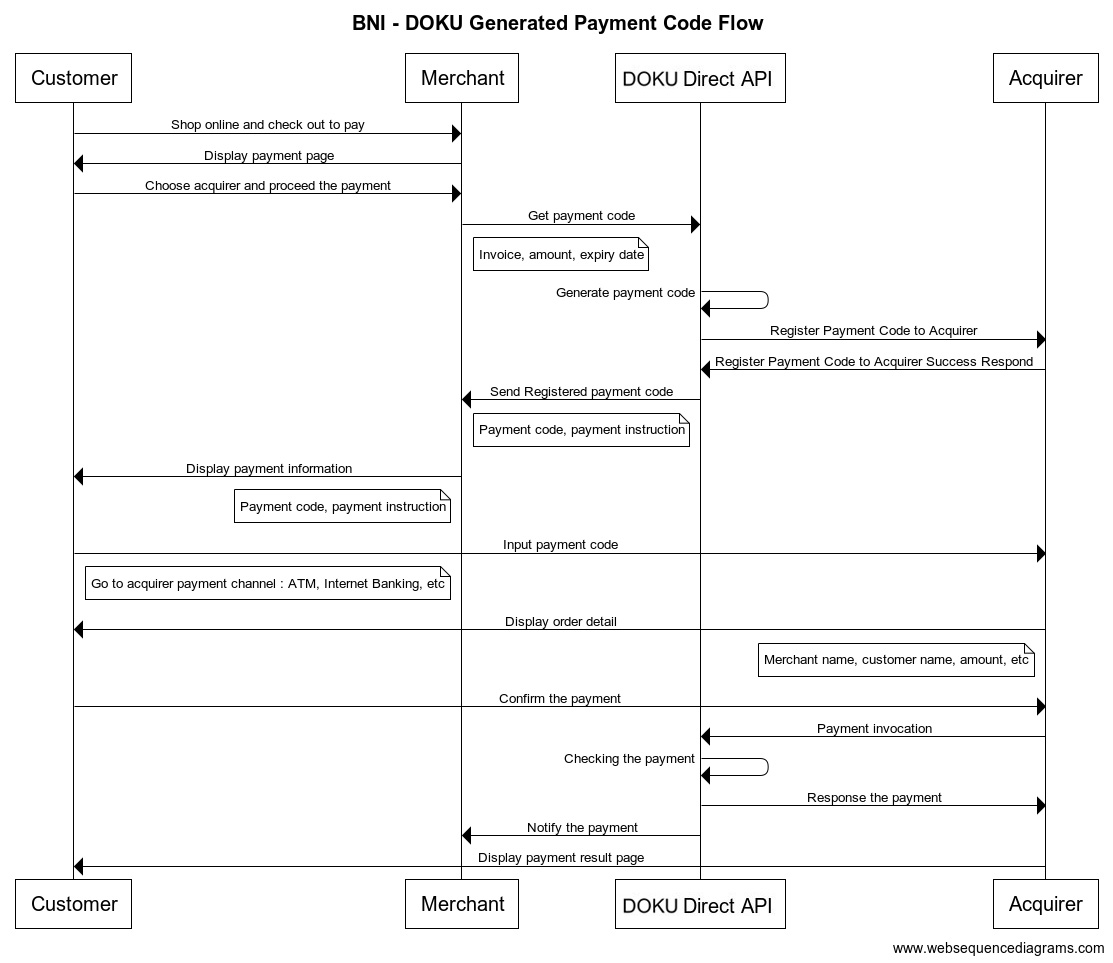
> For the complete documentation index, see [llms.txt](https://developers.doku.com/llms.txt). Markdown versions of documentation pages are available by appending `.md` to page URLs; this page is available as [Markdown](https://developers.doku.com/accept-payments/direct-api/non-snap/convenience-store/alfa-group.md).
# Alfa Group
DOKU has partnered with various partners and one of them is Alfa Group (Alfamart, Alfaexpress, Alfamidi, Lawson, Dan+Dan) to provide O2O Payment. Learn more about how DOKU can help you integrate with Alfa Group here.
***
## Integration methods
There are two methods to integrate with Alfa Group:
1. **Register**: The payment code will be registered to DOKU and Alfa will inquiry to our side when the customer make payment at the Alfa Store
1. **DOKU Generated Payment Code (DGPC)**: The payment code is generated by DOKU. Suitable for e-commerce business model.
2. **Merchant Generated Payment Code (MGPC)**: The payment code is generated by Merchant. Suitable for top up business model.
2. **Direct Inquiry (DIPC)**: The payment code is registered on merchant side and DOKU will forward Alfa inquiry request to merchant side when the customer make payment at the Alfa store
## Integration steps
{% tabs %}
{% tab title="DOKU Generate Payment Code" %}
Here is the overview of how to integrate with Online to Offline:
1. Generate payment code
2. Display payment code
3. Acknowledge payment result
#### 1. Generate payment code
To generate payment code, you will need to hit this API through your Backend:
**API Request**
| Type | Value |
| ----------------------------- | --------------------------------------------------------------------- |
| **HTTP Method** | POST |
| **API endpoint (Sandbox)** | `https://api-sandbox.doku.com/alfa-online-to-offline/v2/payment-code` |
| **API endpoint (Production)** | `https://api.doku.com/alfa-online-to-offline/v2/payment-code` |
Here is the sample of request header to generate payment code:
```
Client-Id: MCH-0001-10791114622547
Request-Id: d24a5644-6078-4249-8740-4a6dcd92df5a
Request-Timestamp: 2020-08-11T08:45:42Z
Signature: HMACSHA256=vl9DBTX5KhEiXmnpOD0TSm8PYQknuHPdyHSTSc3W6Ps=
```
Parameter
Description
client-id
Client ID retrieved from DOKU Back Office
request-id
Unique random string (max 128 characters) generated from merchant side to protect duplicate request
request-timestamp
Timestamp request on UTC time in ISO8601 UTC+0 format. It means to proceed transaction on UTC+7 (WIB), merchant need to subtract time with 7. Ex: to proceed transaction on September 22th 2020 at 08:51:00 WIB, the timestamp should be 2020-09-22T01:51:00Z
signature
Security parameter that needs to be generated on merchant Backend and placed to the header request to ensure that the request is coming from valid merchant. Please refer to this section to generate the signature
Here is the sample of request body to generate payment code:
```json
{
"order": {
"invoice_number": "INV-20210124-0001",
"amount": 150000
},
"online_to_offline_info": {
"expired_time": 60,
"reusable_status": false,
"info": "Merchant Demo Store"
},
"customer": {
"name": "Anton Budiman",
"email": "anton@example.com"
},
"additional_info": {
"override_notification_url": "https://another.example.com/payments/notifications"
}
}
```
**Request Body Explanation**
| Parameter | Type | Mandatory | Description |
| ------------------------------------------- | -------- | --------- | --------------------------------------------------------------------------------------------------------------------------------------------------------------------------------------------------- |
| `order.invoice_number` | `string` | Mandatory |
Generated by merchant to identify the order and must unique per request Allowed chars: alphabetic, numeric, special chars Max length: 64
|
| `order.amount` | `number` | Mandatory |
In IDR currency and without decimal. Alfa only supports Close Amount Allowed chars: numeric Max length: 12
Additional info that will be display on the Alfa POS when customer do inquiry Allowed chars: alphabetic, numeric, special chars Max length: 30
|
| `customer.name` | `string` | Mandatory |
Customer name that will be displayed on acquirer channel when do inquiry Allowed chars: alphabetic, numeric, special chars Max length: 64
|
| `customer.email` | `string` | Optional |
Customer email Allowed chars: alphabetic, numeric, special chars Max length: 128
|
| `additional_info.override_notification_url` | `string` | Optional | This parameter is intended to override the configured `Notification URL` with another URL. Click [here](/get-started-with-doku-api/notification/override-notification-url.md) for more information. |
**API Response**
After hitting the above API request, DOKU will give the response.
| Type | Value |
| --------------- | ------- |
| **HTTP Status** | 200 |
| **Result** | SUCCESS |
```
Client-Id: MCH-0001-10791114622547
Request-Id: d24a5644-6078-4249-8740-4a6dcd92df5a
Response-Timestamp: 2020-08-11T08:45:42Z
Signature: HMACSHA256=9UPUFzOqJc47aJzD9ESOTcWg6TMsg3mqSP+DnUO8ENE=
```
Parameter
Description
client-id
Client ID retrieved from DOKU Back Office
request-id
Unique random string (max 128 characters) generated from merchant side to protect duplicate request
request-timestamp
Timestamp request on UTC time in ISO8601 UTC+0 format. It means to proceed transaction on UTC+7 (WIB), merchant need to subtract time with 7. Ex: to proceed transaction on September 22th 2020 at 08:51:00 WIB, the timestamp should be 2020-09-22T01:51:00Z
signature
Security parameter that needs to be generated on merchant Backend and placed to the header request to ensure that the request is coming from valid merchant. Please refer to this section to generate the signature
Here is the sample of response body:
```json
{
"order": {
"invoice_number": "INV-20210124-0001"
},
"online_to_offline_info": {
"payment_code": "6059000000000205",
"how_to_pay_page": "https://sandbox.doku.com/how-to-pay/v2/alfa-online-to-offline/6059000000000205",
"how_to_pay_api": "https://api-sandbox.doku.com/alfa-online-to-offline/v2/how-to-pay-api/6059000000000205",
"created_date": "20210331115005",
"expired_date": "20210331125005",
"created_date_utc": "2021-03-31T04:50:05Z",
"expired_date_utc": "2021-03-31T05:50:05Z"
},
"additional_info": {
"override_notification_url": "https://another.example.com/payments/notifications"
}
}
```
#### Response Body Explanation
Parameter
Type
Mandatory
Description
order.invoice_number
string
Mandatory
Same as the request
online_to_offline_info. payment_code
string
Mandatory
Generated by DOKU that will be used by customer for doing a payment through Alfa store
online_to_offline_info.how_to_pay_page
string
Optional
Page URL that merchant can use to display how customer can complete the payment process through Alfa store
online_to_offline_info.how_to_pay_api
string
Optional
URL that merchant can parse to display customized how customer can complete the payment process through Alfa store
online_to_offline_info.created_date
string
Conditional
Date time of payment code generated with the format of yyyyMMddHHmmss. The created date uses UTC+7 time
online_to_offline_info.expired_date
string
Conditional
Date time of payment code will be expired with the format of yyyyMMddHHmmss. The expired date uses UTC+7 time. Use this to set the expiry order on merchant side
online_to_offline_info.created_date_utc
string
Conditional
Date time of payment code generated in UTC format
online_to_offline_info.expired_date_utc
string
Conditional
Date time of payment code will be expired in UTC. Use this to set the expiry order on merchant side
additional_info.override_notification_url
string
Optional
Same as the request
{% hint style="info" %}
**PRO TIPS**
You can also show payment instruction link to your customer by using `online_to_offline_info.how_to_pay_page`. If you wish to customize the UI for the payment instruction, you can use the `online_to_offline_info.how_to_pay_api`.
{% endhint %}
#### 2. Display payment code
You can display the payment code to your customer by using `online_to_offline_info.payment_code` that you retrieved from the API response.
#### 3. Acknowledge payment result
After the payment is being made by your customer, DOKU will send **HTTP Notification** to your defined `Notification URL`. Learn how to handle the notification from DOKU:
* [Handling DOKU HTTP Notification](/get-started-with-doku-api/notification/http-notification-sample-non-snap.md)
{% endtab %}
{% tab title="Merchant Generate Payment Code" %}
Here is the overview of how to integrate with Online to Offline:
1. Generate payment code
2. Display payment code
3. Acknowledge payment result
#### 1. Generate payment code
To generate payment code, you will need to hit this API through your Backend:
**API Request**
| Type | Value |
| ----------------------------- | ------------------------------------------------------------------------------ |
| **HTTP Method** | POST |
| **API endpoint (Sandbox)** | |
| **API endpoint (Production)** | |
Here is the sample of request header to generate payment code:
```
Client-Id: MCH-0001-10791114622547
Request-Id: d24a5644-6078-4249-8740-4a6dcd92df5a
Request-Timestamp: 2020-08-11T08:45:42Z
Signature: HMACSHA256=vl9DBTX5KhEiXmnpOD0TSm8PYQknuHPdyHSTSc3W6Ps=
```
Parameter
Description
client-id
Client ID retrieved from DOKU Back Office
request-id
Unique random string (max 128 characters) generated from merchant side to protect duplicate request
request-timestamp
Timestamp request on UTC time in ISO8601 UTC+0 format. It means to proceed transaction on UTC+7 (WIB), merchant need to subtract time with 7. Ex: to proceed transaction on September 22th 2020 at 08:51:00 WIB, the timestamp should be 2020-09-22T01:51:00Z
signature
Security parameter that needs to be generated on merchant Backend and placed to the header request to ensure that the request is coming from valid merchant. Please refer to this section to generate the signature
Here is the sample of request body to generate payment code:
```
{
"order": {
"invoice_number": "INV-20210124-0001",
"amount": 150000
},
"online_to_offline_info": {
"payment_code": "1900600000000046",
"expired_time": 60,
"reusable_status": false,
"info": "Merchant Demo Store",
},
"customer": {
"name": "Anton Budiman",
"email": "anton@example.com"
}
}
```
#### Request Body Explanation
Parameter
Type
Mandatory
Description
order.invoice_number
string
Mandatory
Generated by merchant to identify the order and must unique per request Allowed chars: alphabetic, numeric, special chars Max length: 64
order.amount
number
Mandatory
In IDR currency and without decimal. Alfa only supports Close Amount Allowed chars: numeric Max length: 12
online_to_offline_info. payment_code
string
Mandatory
Generated by Merchant that will be used by customer for doing a payment through Alfa store Max Length: 20
online_to_offline_info.expired_time
number
Optional
Payment code expiration time in minutes format Allowed chars: numeric Maximum length: 5 Default value: 60
online_to_offline_info.reusable_status
number
Mandatory
For payment code that can be paid more than once, set this to true Possible value: truefalse
online_to_offline_info.info
string
Optional
Additional info that will be display on the Alfa POS when customer do inquiry Allowed chars: alphabetic, numeric, special chars Max length: 30
customer.name
string
Mandatory
Customer name that will be displayed on Alfa POS when do inquiry Allowed chars: alphabetic, numeric, special chars Max length: 64
customer.email
string
Optional
Customer email Allowed chars: alphabetic, numeric, special chars Max length: 128
**API Response**
After hitting the above API request, DOKU will give the response.
| Type | Value |
| --------------- | ------- |
| **HTTP Status** | 200 |
| **Result** | SUCCESS |
```
Client-Id: MCH-0001-10791114622547
Request-Id: d24a5644-6078-4249-8740-4a6dcd92df5a
Response-Timestamp: 2020-08-11T08:45:42Z
Signature: HMACSHA256=9UPUFzOqJc47aJzD9ESOTcWg6TMsg3mqSP+DnUO8ENE=
```
Parameter
Description
client-id
Client ID retrieved from DOKU Back Office
request-id
Unique random string (max 128 characters) generated from merchant side to protect duplicate request
request-timestamp
Timestamp request on UTC time in ISO8601 UTC+0 format. It means to proceed transaction on UTC+7 (WIB), merchant need to subtract time with 7. Ex: to proceed transaction on September 22th 2020 at 08:51:00 WIB, the timestamp should be 2020-09-22T01:51:00Z
signature
Security parameter that needs to be generated on merchant Backend and placed to the header request to ensure that the request is coming from valid merchant. Please refer to this section to generate the signature
Here is the sample of response body:
```
{
"order": {
"invoice_number": "INV-20210124-0001"
},
"online_to_offline_info": {
"payment_code": "1900600000000046",
"how_to_pay_page": "https://sandbox.doku.com/how-to-pay/v1/alfa-online-to-offline/1900600000000046",
"how_to_pay_api": "https://sandbox.doku.com/alfa-online-to-offline/v1/how-to-pay-api/1900600000000046",
"created_date": "20200313095850",
"expired_date": "20200313155850",
"created_date_utc": "2020-03-31T09:58:50Z",
"expired_date_utc": "2020-03-31T15:58:50Z"
}
}
```
Response Body Explanation
Response Body Explanation
Parameter
Type
Mandatory
Description
order.invoice_number
string
Mandatory
Same as the request
online_to_offline_info. payment
string
Mandatory
Generated by DOKU that will be used by customer for doing a payment through Alfa store
online_to_offline_info.how_to_pay_page
string
Optional
Page URL that merchant can use to display how customer can complete the payment process through Alfa store
online_to_offline_info.how_to_pay_api
string
Optional
URL that merchant can parse to display customized how customer can complete the payment process through Alfa store
online_to_offline_info.created_date
string
Conditional
Date time of payment code generated with the format of yyyyMMddHHmmss. The created date uses UTC+7 time
online_to_offline_info.expired_date
string
Conditional
Date time of payment code will be expired with the format of yyyyMMddHHmmss. The expired date uses UTC+7 time. Use this to set the expiry order on merchant side
online_to_offline_info.created_date_utc
string
Conditional
Date time of payment code generated in UTC format
online_to_offline_info.expired_date_utc
string
Conditional
Date time of payment code will be expired in UTC. Use this to set the expiry order on merchant side
{% hint style="info" %}
**PRO TIPS**
You can also show payment instruction link to your customer by using `online_to_offline_info.how_to_pay_page`. If you wish to customize the UI for the payment instruction, you can use the `online_to_offline_info.how_to_pay_api`.
{% endhint %}
#### 2. Display payment code
You can display the payment code to your customer by using `online_to_offline_info.payment_code` that you retrieved from the API response.
#### 3. Acknowledge payment result
After the payment is being made by your customer, DOKU will send **HTTP Notification** to your defined `Notification URL`. Learn how to handle the notification from DOKU:
* [Handling DOKU HTTP Notification](/get-started-with-doku-api/notification/http-notification-sample-non-snap.md)
{% endtab %}
{% tab title="Direct Inquiry" %}
Here is the overview of how to integrate with Alfa Group:
1. Setup `Inquiry URL`
2. Generate payment code
3. Receive inquiry request from DOKU
4. Acknowledge payment result
1. **Setup Inquiry URL**
To receive the inquiry request from DOKU. You must set your `Inquiry URL` to DOKU. Please contact our team for the setup.
Please inform the `Inquiry URL` for Sandbox environment and Production environment.
2. **Generate Payment Code**
Generate payment is done in your system. The payment code length maximum is `20` digits.
3. **Receive Inquiry Request from DOKU**
#### API Request
DOKU will hits your `Inquiry URL` with the following API request:
| Type | Value |
| ----------- | ----- |
| HTTP Method | POST |
Here is the sample of request header that DOKU generated for inquiry:
```json
Client-Id: MCH-0001-10791114622547
Request-Id: d24a5644-6078-4249-8740-4a6dcd92df5a
Request-Timestamp: 2020-08-11T08:45:42Z
Signature: HMACSHA256=vl9DBTX5KhEiXmnpOD0TSm8PYQknuHPdyHSTSc3W6Ps=
```
Request Header Explanation
Parameter
Description
Client-Id
Client ID retrieved from DOKU Back Office
Request-Id
Unique random string (max 128 characters) generated from DOKU side to protect duplicate request
Request-Timestamp
Timestamp request on UTC time in ISO8601 UTC+0 format. It means to proceed transaction on UTC+7 (WIB), merchant need to subtract time with 7. Ex: to proceed transaction on September 22th 2020 at 08:51:00 WIB, the timestamp should be 2020-09-22T01:51:00Z
Signature
Security parameter that needs to be verified on merchant Backend to ensure that the request is coming from DOKU. Please refer to this section to generate the signature
Here is the sample of request body that DOKU will send to defined `Inquiry URL`:
```json
{
"service": {
"id":"ONLINE_TO_OFFLINE"
},
"acquirer": {
"id":"ALFA"
},
"channel": {
"id":"ONLINE_TO_OFFLINE_ALFA"
},
"online_to_offline_info": {
"payment_code":"8896512345678123"
},
"online_to_offline_inquiry": {
"date":"2020-08-11T08:45:42Z",
"identifier": [
]
}
}
```
#### **Request Body Explanation**
| Parameter | Type | Mandatory | Description |
| -------------------------------------- | -------- | --------- | --------------------------------------------------------------------------------------------------------- |
| `service.id` | `string` | Mandatory | Value: `ONLINE_TO_OFFLINE` |
| `acquirer.id` | `string` | Mandatory | Value: `ALFA` |
| `channel.id` | `string` | Mandatory | Value: `ONLINE_TO_OFFLINE_ALFA` |
| `online_to_offline_info.payment_code` | `number` | Mandatory | Payment code that is inquired by the customer |
| `online_to_offline_inquiry.date` | `string` | Mandatory | Timestamp request on UTC time in ISO8601 format |
| `online_to_offline_inquiry.identifier` | `array` | Optional | List of transaction identifier that coming from the acquiring. Merchant can save these data for reference |
**API Response**[****](https://dashboard.doku.com/docs/docs/jokul-direct/e-money/shopeepay-guide/#api-response)
After DOKU hits your `Inquiry URL` with the above API request, you must give the following response:
Type
Value
HTTP Status for online_to_offline_inquiry.status = success
200
HTTP Status for online_to_offline_inquiry.status = decline
400
HTTP Status for online_to_offline_inquiry.status = billing_already_paid
400
HTTP Status for online_to_offline_inquiry.status = billing_was_expired
400
HTTP Status for online_to_offline_inquiry.status = billing_not_found
404
HTTP Status for online_to_offline_inquiry.status = invalid_signature
Timestamp Response on UTC with format ISO8601 UTC+0 from Merchant
Signature
Signature generated by Merchant based on the response body. Please refer to this section to generate the signature
Here is the sample of response body:
```json
{
"order": {
"invoice_number":"MINV20201231468",
"amount":150000
},
"online_to_offline_info": {
"payment_code":"8896512345678123",
"info1":"Thanks for shooping"
},
"online_to_offline_inquiry": {
"status":"success"
},
"customer": {
"name":"Taufik Ismail",
"email":"taufik@doku.com"
}
"additional_info": {
}
}
```
#### Response Body Explanation
Parameter
Type
Mandatory
Description
order.invoice_number
string
Mandatory
Generated by merchant to identify the order and must unique per request Allowed chars: alphabetic, numeric, special chars Max length: 64
order.amount
number
Mandatory
In IDR currency and without decimal. Alfa only supports Close Amount Allowed chars: numeric Max length: 12
online_to_offline_info.payment_code
string
Mandatory
Same as the request
online_to_offline_info.info
string
Optional
Additional info that will be display on the Alfa POS when customer do inquiry Allowed chars: alphabetic, numeric, special chars Max length: 30
online_to_offline_inquiry.status
string
Mandatory
Possible value: success, decline, billing_already_paid, billing_was_expired, billing_not_found
customer.name
string
Mandatory
Customer name that will be displayed on Alfa POS when do inquiry Allowed chars: alphabetic, numeric, special chars Max length: 64
customer.email
string
Optional
Customer email Allowed chars: alphabetic, numeric, special chars Max length: 128
additional_info
object
Optional
Merchant can send additional data through this parameter and will be get the data in the HTTP Notification
#### 4. Acknowledge payment result
After the payment is being made by your customer, DOKU will send **HTTP Notification** to your defined `Notification URL`. Learn how to handle the notification from DOKU:
* [Handling DOKU HTTP Notification](/get-started-with-doku-api/notification/http-notification-sample-non-snap.md)
{% endtab %}
{% endtabs %}
***
## Additional features
We provide various additional features to suited your needs. Learn more here.
### Insurance Data
For insurance merchant, DOKU can show insurance data to Alfa POS and Alfa receipt by give object `additional_info.insurance_info` and also DOKU can show footer message on Alfa receipt by give `alfa_info.receipt.footer_message` to DOKU. Here is the sample:
```json
{
...
"alfa_info": {
"receipt": {
"footer_message":"Call Center 021 555-0525"
}
},
"additional_info": {
"insurance_info": {
"policy_type": "Dana Pendidikan",
"policy_number": "9090901234",
"policy_account_name": "Taufik Ismail",
"policy_status": "aktif",
"bill_due_date": "21 May 2021"
}
},
...
}
```
### Update and Cancel Payment Code Data
If you wish to update your payment code data such as, update the amount, update the expiry time, customer details, and etc. You can do that by hitting the API with `PATCH` method:
**API Request**
Here is the sample of request header to update payment code:
```json
Client-Id: MCH-0001-10791114622547
Request-Id: 2dc5985e-adaa-4f82-b126-b09e9006da14
Request-Timestamp: 2020-08-11T08:45:42Z
Signature: HMACSHA256=vl9DBTX5KhEiXmnpOD0TSm8PYQknuHPdyHSTSc3W6Ps=
```
#### Request Header Explanation
Parameter
Description
Client-Id
Client ID retrieved from DOKU Back Office
Request-Id
Unique random string (max 128 characters) generated from merchant side to protect duplicate request
Request-Timestamp
Timestamp request on UTC time in ISO8601 UTC+0 format. It means to proceed transaction on UTC+7 (WIB), merchant need to subtract time with 7. Ex: to proceed transaction on September 22th 2020 at 08:51:00 WIB, the timestamp should be 2020-09-22T01:51:00Z
Signature
Security parameter that needs to be generated on merchant Backend and placed to the header request to ensure that the request is coming from valid merchant. Please refer to this section to generate the signature
Here is the sample of request body to update payment code data:
{% hint style="info" %}
**Cancel payment code data**
To cancel a payment code, simply set `online_to_offline_info.status` to `DELETE`
{% endhint %}
```json
{
"order": {
"invoice_number": "INV-20210124-0001",
"amount": 150000
},
"online_to_offline_info": {
"payment_code": "6059000000000205",
"status": "ACTIVE",
"expired_time": 60,
"reusable_status": false,
"info": "Thank you for shopping"
},
"customer": {
"name": "Anton Budiman",
"email": "anton@example.com"
}
}
```
**Request Body Explanation**
Parameter
Type
Mandatory
Description
order.invoice_number
string
Same as the generate payment code request
order.amount
number
Conditional
Set this with updated value if wished. Set this parameter to more than (>) 0for Close Amount Allowed chars: numeric Max length: 12
online_to_offline_info.payment_code
string
Mandatory
The payment code that wish to be updated
online_to_offline_info.status
string
Mandatory
Set ACTIVE to update the payment code and set DELETE to cancel the payment code Possible value: ACTIVE, DELETE
online_to_offline_info.expired_time
number
Optional
Set this with updated value if wished Allowed chars: numeric Maximum length: 5 Default value: 60
online_to_offline_info.reusable_status
number
Mandatory
Set this with updated value if wished Possible value: truefalse
online_to_offline_info.info
string
Optional
Additional info that will be display on the Alfa POS when customer do inquiry Allowed chars: alphabetic, numeric, special chars Max length: 30
customer.name
string
Mandatory
Set this with updated value if wished Allowed chars: alphabetic, numeric, special chars Max length: 40
customer.email
string
Optional
Set this with updated value if wished Allowed chars: alphabetic, numeric, special chars Max length: 128
**API Response**
After hitting the above API request, DOKU will give the response.
| Type | Value |
| --------------- | ------- |
| **HTTP Status** | 200 |
| **Result** | SUCCESS |
```json
Client-Id: MCH-0001-10791114622547
Request-Id: 09e0defe-a071-45b3-9feb-ac134374628c
Response-Timestamp: 2020-08-11T08:45:42Z
Signature: HMACSHA256=9UPUFzOqJc47aJzD9ESOTcWg6TMsg3mqSP+DnUO8ENE=
```
#### Response Header Explanation
Parameter
Description
Client-Id
Same as the request
Request-Id
Same as the request
Response-Timestamp
Timestamp Response on UTC with format ISO8601 UTC+0 from DOKU
Signature
Signature generated by DOKU based on the response body
Here is the sample of response body:
```json
{
"order": {
"invoice_number": "INV-20210124-0001"
},
"online_to_offline_info": {
"payment_code": "6059000000000205",
"created_date": "20210331115005",
"expired_date": "20210331125005",
"created_date_utc": "2021-03-31T04:50:05Z",
"expired_date_utc": "2021-03-31T05:50:05Z"
}
}
```
#### Response Body Explanation
Parameter
Type
Mandatory
Description
order.invoice_number
string
Mandatory
Same as the request
online_to_offline_info. payment_code
string
Mandatory
Generated by DOKU that will be used by customer for doing a payment through Alfa store
online_to_offline_info.created_date
string
Conditional
Date time of payment code generated with the format of yyyyMMddHHmmss. The created date uses UTC+7 time
online_to_offline_info.expired_date
string
Conditional
Date time of payment code will be expired with the format of yyyyMMddHHmmss. The expired date uses UTC+7 time. Use this to set the expiry order on merchant side
online_to_offline_info.created_date_utc
string
Conditional
Date time of payment code generated in UTC format
online_to_offline_info.expired_date_utc
string
Conditional
Date time of payment code will be expired in UTC. Use this to set the expiry order on merchant side
#### Split Settlement
If you are a platform or a marketplace, you can use this feature to settle the funds to your sellers or partners programmatically, save many operational efforts.
* [Settlement](#split-settlement-1)
***
## What's next?
You can test your payment through our Payment Simulator. Learn more [here](/accept-payments/doku-checkout/integration-guide/simulate-payment-and-notification.md).
.png?alt=media&token=9045f5ce-d68a-4db9-ab57-78d01ec86f47)