# DOKU e-Wallet

### Integration steps <a href="#integration-steps" id="integration-steps"></a>

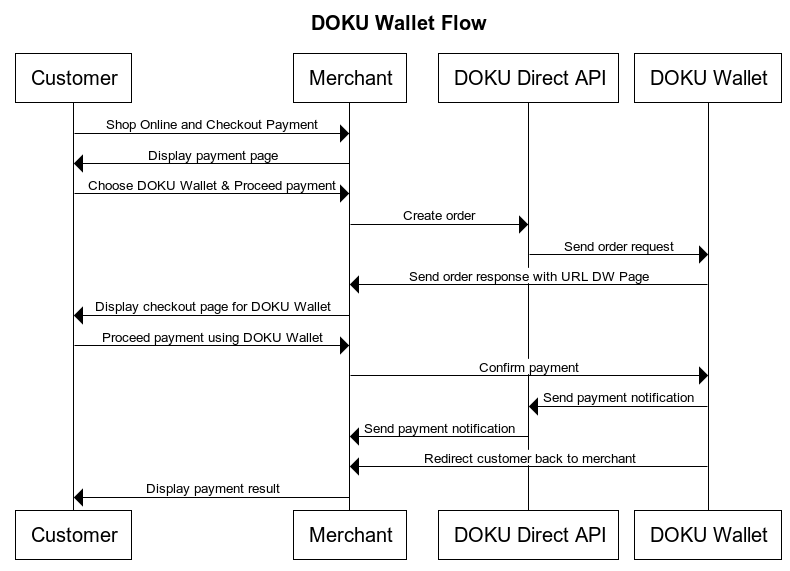
Here is the overview of how to integrate with DOKU e-Wallet:

1. Obtain `payment.url` by generating order
2. Display DOKU Wallet payment page to customer
3. Acknowledge payment result

#### Direct API - DOKU e-Wallet Sequence Diagram

<figure><img src="/files/QULVk8iea2WmMAl2d0wG" alt=""><figcaption></figcaption></figure>

***

#### 1. Obtain `payment.url` by generating order <a href="#id-1-obtain-paymenturl-by-generating-order" id="id-1-obtain-paymenturl-by-generating-order"></a>

To generate order, you will need to hit this API through your Backend:

**API Request**

| Type                          | Value                                                       |
| ----------------------------- | ----------------------------------------------------------- |
| **HTTP Method**               | POST                                                        |
| **API endpoint (Sandbox)**    | `https://api-sandbox.doku.com/dokuwallet-emoney/v1/payment` |
| **API endpoint (Production)** | `https://api.doku.com/dokuwallet-emoney/v1/payment`         |

Here is the sample of request header to generate order:

```
Client-Id: MCH-0001-10791114622547
Request-Id: baec7d95-f30a-4b78-b711-6ebe0ccdf50b
Request-Timestamp: 2021-07-07T08:45:42Z
Signature: HMACSHA256=vl9DBTX5KhEiXmnpOD0TSm8PYQknuHPdyHSTSc3W6Ps=
```

#### Request Header Explanation

<table><thead><tr><th width="207">Parameter</th><th>Description</th></tr></thead><tbody><tr><td><strong>Client-Id</strong></td><td>Client ID retrieved from DOKU Back Office</td></tr><tr><td><strong>Request-Id</strong></td><td>Unique random string (max 128 characters) generated from merchant side to protect duplicate request</td></tr><tr><td><strong>Request-Timestamp</strong></td><td>Timestamp request on UTC time in ISO8601 UTC+0 format. It means to proceed transaction on UTC+7 (WIB), merchant need to subtract time with 7. Ex: to proceed transaction on September 22th 2020 at 08:51:00 WIB, the timestamp should be 2020-09-22T01:51:00Z</td></tr><tr><td><strong>Signature</strong></td><td>Security parameter that needs to be generated on merchant Backend and placed to the header request to ensure that the request is coming from valid merchant. Please refer to <a href="/pages/9uXtc55i3bhjXaqAJZOx">this section</a> to generate the signature</td></tr></tbody></table>

Here is the sample request body to generate order:

```json
{
    "order": {
        "invoice_number":"TEST-1234",
        "amount": 9000,
        "line_items": [
            {
                "name": "T-Shirt Red",
                "price": 3000,
                "quantity": 2
            },
            {
                "name": "Polo Navy",
                "price": 3000,
                "quantity": 1
            }
        ],
        "success_url": "https://your-success-url.domain/",
        "failed_url": "https://your-failed-url.domain/",
        "notify_url": "https://merchant.com/notify-url",
        "auto_redirect": false
    },
    "additional_info": {
        "override_notification_url": "https://another.example.com/payments/notifications"
    }
}
```

#### Request Body Explanation

<table><thead><tr><th width="165">Parameter</th><th width="100">Type</th><th width="135">Mandatory</th><th>Description</th></tr></thead><tbody><tr><td><code>order.invoice_number</code></td><td>string</td><td>Mandatory</td><td>Generated by merchant to identify the order and must unique per request<br>Allowed chars: <code>alphabetic, numeric, special chars</code><br>Max length: <code>64</code></td></tr><tr><td><code>order.amount</code></td><td>number</td><td>Mandatory</td><td>In IDR currency and without decimal<br>Allowed chars: <code>numeric</code><br>Max length: <code>12</code></td></tr><tr><td><code>order.line_items.name</code></td><td>string</td><td>Conditional</td><td>Optional if request doesnt pass line items. But if request passes, then it becomes Mandatory.<br>Allowed chars: <code>alphabetic, numeric, special chars</code><br>Max Length: <code>255</code></td></tr><tr><td><code>order.line_items.price</code></td><td>number</td><td>Conditional</td><td>Price of the product item. Total price and quantity must match with the <code>order.amount</code>. Optional if request doesnt pass line items. But if request passes, then it becomes Mandatory.<br>Allowed chars: <code>numeric</code><br>Max Length: <code>12</code></td></tr><tr><td><code>order.line_items.quantity</code></td><td>number</td><td>Conditional</td><td>Quantity of the product item&#x3C;. Optional if request doesnt pass line items. But if request passes, then it becomes Mandatory.<br>Allowed chars: <code>numeric</code><br>Max Length: <code>4</code></td></tr><tr><td><code>success_url</code></td><td>string</td><td>Optional</td><td>Merchant URL that will redirected to after the order success. If merchant set <code>order.auto_redirect</code> to <code>true</code>, then the default url is "<a href="http://www.doku.com&#x22;/">www.doku.com"</a>.<br>Allowed chars: <code>alphabetic, numeric, special chars</code></td></tr><tr><td><code>failed_url</code></td><td>string</td><td>Optional</td><td>Merchant URL that will redirected to after the order failed. If not set, then will redirect to <code>success_url</code><br>Allowed chars: <code>alphabetic, numeric, special chars</code></td></tr><tr><td><code>notify_url</code></td><td>string</td><td>Mandatory</td><td>Merchant URL that will be notify from DOKU. If its not define, status in merchant will not update.<br>Allowed chars: <code>alphabetic, numeric, special chars</code></td></tr><tr><td><code>auto_redirect</code></td><td>string</td><td>Mandatory</td><td>Redirection to defined <code>success_url</code> after payment process completed<br>Possible value: <code>true, false</code><br>Default value: <code>false</code></td></tr><tr><td><code>additional_info.override_notification_url</code></td><td>string</td><td>Optional</td><td>This parameter is intended to override the configured <code>Notification URL</code> with another URL.  Click <a href="/pages/LfaJBdkpBWDjF7mwEimR">here</a> for more information.</td></tr></tbody></table>

**API Response**

After hitting the above API request, DOKU will give the response.

| Type            | Value   |
| --------------- | ------- |
| **HTTP Status** | 200     |
| **Result**      | SUCCESS |

```
Client-Id: MCH-0001-10791114622547
Request-Id: baec7d95-f30a-4b78-b711-6ebe0ccdf50b
Response-Timestamp: 2021-07-07T08:45:42Z
Signature: HMACSHA256=9UPUFzOqJc47aJzD9ESOTcWg6TMsg3mqSP+DnUO8ENE=
```

#### Response Header Explanation

<table><thead><tr><th width="207">Parameter</th><th>Description</th></tr></thead><tbody><tr><td><strong>Client-Id</strong></td><td>Same as the request</td></tr><tr><td><strong>Request-Id</strong></td><td>Same as the request</td></tr><tr><td><strong>Request-Timestamp</strong></td><td>Timestamp Response on UTC with format ISO8601 UTC+0 from DOKU</td></tr><tr><td><strong>Signature</strong></td><td>Signature generated by DOKU based on the response body</td></tr></tbody></table>

Here is the sample of response body:

```json
{
    "order": {
        "invoice_number": "JT-JOKUL-PP_20220125093936",
        "line_items": [
            {
                "name": "T-Shirt Red",
                "price": 3000,
                "quantity": 2
            },
            {
                "name": "Polo Navy",
                "price": 3000,
                "quantity": 1
            }
        ]
    },
    "doku_wallet_payment_page": {
        "url": "https://staging.doku.com/wallauth/jokultransaction?sessionId=ff54640d-8a3d-4efb-a867-47785971c7c9"
    },
    "additional_info": {
        "override_notification_url": "https://another.example.com/payments/notifications"
    }
}
```

#### Response Body Explanation

<table><thead><tr><th width="188">Parameter</th><th width="90">Type</th><th width="118">Mandatory</th><th>Description</th></tr></thead><tbody><tr><td><code>order.invoice_number</code></td><td>string</td><td>Mandatory</td><td>Same as the request</td></tr><tr><td><code>order.line_items.name`</code></td><td>number</td><td>Mandatory</td><td>Same as the request</td></tr><tr><td><code>order.line_items.price</code></td><td>number</td><td>Mandatory</td><td>Same as the request</td></tr><tr><td><code>order.line_items.quantity</code></td><td>number</td><td>Mandatory</td><td>Same as the request</td></tr><tr><td><code>doku_wallet_payment_page.url</code></td><td>string</td><td>Mandatory</td><td>DOKU Wallet Payment Page URL generated by DOKU that merchant displays to the customer</td></tr><tr><td><code>additional_info.override_notification_url</code></td><td>string</td><td>Optional</td><td>Same as the request</td></tr></tbody></table>

***

#### 2. Display DOKU Wallet payment page to customer <a href="#id-2-display-doku-wallet-payment-page-to-customer" id="id-2-display-doku-wallet-payment-page-to-customer"></a>

Once you have the `payment.url`, you can now display the payment page by redirecting your customer to the DOKU Wallet payment page.

After the customer completed the payment, they will be redirected to the defined `success_url` that you set on the API request.

***

#### 3. Acknowledge payment result <a href="#id-3-acknowledge-payment-result" id="id-3-acknowledge-payment-result"></a>

After the payment is being made by your customer, DOKU will send **HTTP Notification** to your defined `Notification URL`. Learn how to handle the notification from DOKU:

* [Handling DOKU HTTP Notification](/get-started-with-doku-api/notification/http-notification-sample-non-snap.md)

***


---

# Agent Instructions: Querying This Documentation

If you need additional information that is not directly available in this page, you can query the documentation dynamically by asking a question.

Perform an HTTP GET request on the current page URL with the `ask` query parameter:

```
GET https://developers.doku.com/archive/non-snap/e-wallet/doku-e-wallet.md?ask=<question>
```

The question should be specific, self-contained, and written in natural language.
The response will contain a direct answer to the question and relevant excerpts and sources from the documentation.

Use this mechanism when the answer is not explicitly present in the current page, you need clarification or additional context, or you want to retrieve related documentation sections.
