# LinkAja

DOKU has partnered with various e-money providers and one of them is Link Aja to provide E-Money Payment. Learn more about how DOKU can help you integrate with Link Aja here.

***

### Integration steps <a href="#integration-steps" id="integration-steps"></a>

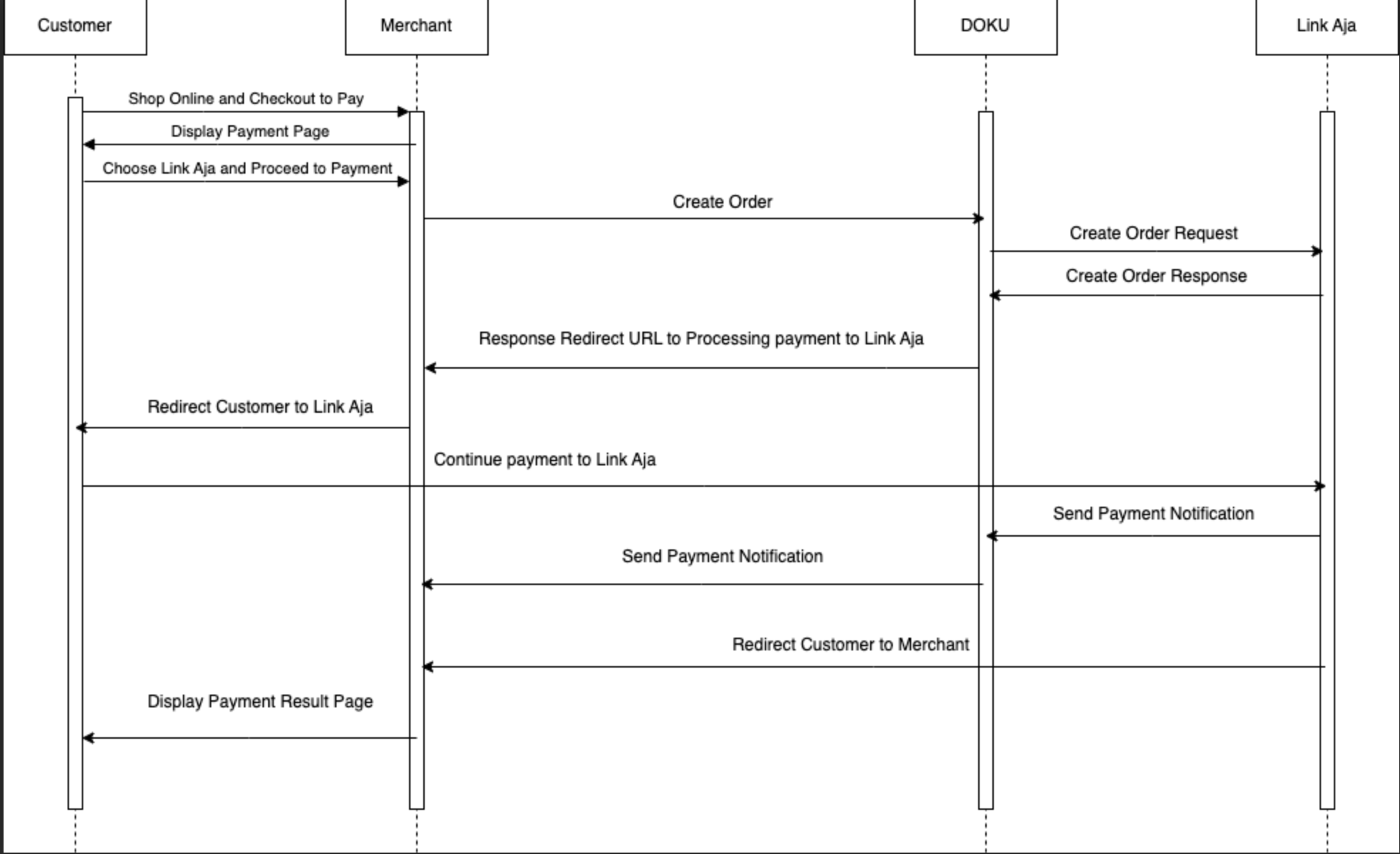
Here is the overview of how to integrate with Link Aja:

1. Generate request
2. Complete payment in Link Aja App
3. Acknowledge payment result

#### Link Aja Sequence Diagram

<figure><img src="https://3092822868-files.gitbook.io/~/files/v0/b/gitbook-x-prod.appspot.com/o/spaces%2FqCxtvLoJNNxvp4U7kLHd%2Fuploads%2FqTXax7clnRh3UGAnVpWE%2FLink-aja.png?alt=media&#x26;token=c4d66574-7f74-48b3-8764-4f4318fb8529" alt=""><figcaption></figcaption></figure>

***

#### 1. Generate Request <a href="#id-1-generate-request" id="id-1-generate-request"></a>

To generate request, you will need to hit this API through your Backend :

**API Request**

| Type                          | Value                                                                  |
| ----------------------------- | ---------------------------------------------------------------------- |
| **HTTP Method**               | POST                                                                   |
| **API endpoint (Sandbox)**    | `https://api-sandbox.doku.com/linkaja-emoney/v2/ServiceRequestPayment` |
| **API endpoint (Production)** | `https://api.doku.com/linkaja-emoney/v2 /ServiceRequestPayment`        |

Here is the sample of request header to create an order:

```
Client-Id: OCO-0203-1676104296656
Request-Id: 24bb5232-3fe6-47a5-b0b0-d0fc3c6b5fdb
Request-Timestamp: 2023-06-08T08:50:00Z
Signature: HMACSHA256=vl9DBTX5KhEiXmnpOD0TSm8PYQknuHPdyHSTSc3W6Ps=
```

#### Request Header Explanation

<table><thead><tr><th width="207">Parameter</th><th>Description</th></tr></thead><tbody><tr><td><strong>Client-Id</strong></td><td>Client ID retrieved from DOKU Back Office</td></tr><tr><td><strong>Request-Id</strong></td><td>Unique random string (max 128 characters) generated from merchant side to protect duplicate request</td></tr><tr><td><strong>Request-Timestamp</strong></td><td>Timestamp request on UTC time in ISO8601 UTC+0 format. It means to proceed transaction on UTC+7 (WIB), merchant need to subtract time with 7. Ex: to proceed transaction on September 22th 2020 at 08:51:00 WIB, the timestamp should be 2020-09-22T01:51:00Z</td></tr><tr><td><strong>Signature</strong></td><td>Security parameter that needs to be generated on merchant Backend and placed to the header request to ensure that the request is coming from valid merchant. Please refer to <a href="../../../../get-started-with-doku-api/signature-component/non-snap/signature-from-api-get-method">this section</a> to generate the signature</td></tr></tbody></table>

Here is a sample of request body to create an order:

```json
{
    "order": {
        "invoice_number": "INV-20210124-0001",
        "amount": 150000,
        "callback_url": "https://merchant.com/return-url",
        "line_items": [
             {
               "name":" Roti",
               "price": 10000,
               "quantity": 1
             } 
        ]
    },
    "customer": {
            "name": "Jessica Tessalonika",
            "email": "example@doku.com",
            "phone" : "081112345678"
    },
    "additional_info": {
        "override_notification_url": "https://another.example.com/payments/notifications"
    }
}
```

**Request Body Explanation**

<table><thead><tr><th>Parameter</th><th width="97">Type</th><th width="125">Mandatory</th><th>Description</th></tr></thead><tbody><tr><td><code>order.invoice_number</code></td><td>string</td><td>Mandatory</td><td>Merchant's designated transaction invoice number<br>Allowed chars: <code>alphabetic, numeric, special chars</code></td></tr><tr><td><code>order.amount</code></td><td>number</td><td>Mandatory</td><td>Transaction amount<br>Allowed chars: <code>numeric</code></td></tr><tr><td><code>order.callback_url</code></td><td>string</td><td>Mandatory</td><td>Merchant URL that will redirected to after the order completed</td></tr><tr><td><code>order.line_items</code></td><td>string</td><td>Mandatory</td><td>Information about customer's basket (item's name, price, and quantities)</td></tr><tr><td><code>customer.name</code></td><td>string</td><td>Optional</td><td>Information about customer's name</td></tr><tr><td><code>customer.email</code></td><td>string</td><td>Optional</td><td>Information about customer's email</td></tr><tr><td><code>customer.phone</code></td><td>number</td><td>Optional</td><td>Information about customer's phone</td></tr><tr><td><code>additional_info.override_notification_url</code></td><td>string</td><td>Optional</td><td>This parameter is intended to override the configured Notification URL with another URL. Click <a href="../../../../get-started-with-doku-api/notification/override-notification-url">here</a> for more information.</td></tr></tbody></table>

**API Response**

After hitting the above API request, DOKU will give the response.

| Type            | Value   |
| --------------- | ------- |
| **HTTP Status** | 200     |
| **Result**      | SUCCESS |

```
Client-Id: MCH-0001-10791114622547
Request-Id: 24bb5232-3fe6-47a5-b0b0-d0fc3c6b5fdb
Response-Timestamp: 2021-07-09T02:05:14Z
Signature: HMACSHA256=9UPUFzOqJc47aJzD9ESOTcWg6TMsg3mqSP+DnUO8ENE=
```

#### Response Header Explanation

<table><thead><tr><th width="207">Parameter</th><th>Description</th></tr></thead><tbody><tr><td><strong>Client-Id</strong></td><td>Same as the request</td></tr><tr><td><strong>Request-Id</strong></td><td>Same as the request</td></tr><tr><td><strong>Request-Timestamp</strong></td><td>Timestamp Response on UTC with format ISO8601 UTC+0 from DOKU</td></tr><tr><td><strong>Signature</strong></td><td>Signature generated by DOKU based on the response body</td></tr></tbody></table>

Here is the sample of response body:

```json
{
"order": {
        "invoice_number": "LINKAJA23052595",
        "amount": "10000.00"
    },
    "emoney_configuration": {
        "identifier": [
            {
                "name": "TERMINAL_ID",
                "value": "e2etest"
            } 
        ]
    },
    "emoney_payment": {
        "redirect_method_http": "POST",
        "redirect_url_http": "https://api-uat.doku.com/doku/simulator/v1/linkaja/redirectPostToPost",
        "redirect_parameter": [
            {
                "name": "Message",
                "value": 
                "cXAwdzcvd3VEeDlRTzl0V1g1NGZyMmpQbFBPMDQxaHpyclNLazdlV09PTUZ1Z1lJaDlscjU1QmZNS2VPTTNiOGpFY3Mzbmp1dStqUjRWL3FaTGRsekVQWVF3YWRRUVQ2UzZsQkFRSzl2ek1zbERWQWtEY01EV0xpaTYrcnRYVUJmSkYvc0tXbGpRWXFCMHVMVHpKMXZTRSt2eTY5K2lOQ3k4aFdCTTBUc2ZGaTlYaWdQZ1JGZ2VjWTNaUlBNT0JCaTNnUzdhMitrNkRlY2hZMWh1R2xpQWtLMTlrLzIyWkxLWnNxQXZTU1VkdllqV0FmeGtqVTVzUjM3ZUIvSE9mag=="
            } 
        ],
        "status": "PENDING"
    },
    "additional_info": {
        "override_notification_url": "https://another.example.com/payments/notifications"
    }
}
```

#### Response Body Explanation <a href="#id-2-complete-payment-in-link-aja" id="id-2-complete-payment-in-link-aja"></a>

<table><thead><tr><th>Parameter</th><th width="97">Type</th><th width="125">Mandatory</th><th>Description</th></tr></thead><tbody><tr><td><code>order.invoice_number</code></td><td>string</td><td>Mandatory</td><td>Same as the request</td></tr><tr><td><code>order.amount</code></td><td>number</td><td>Mandatory</td><td>Same as the request</td></tr><tr><td>emoney_configuration.identifier</td><td>string</td><td>Mandatory</td><td>Merchant identifier by Link Aja<br>Max length: <code>15</code><br>Allowed chars: <code>alphabetic, numeric</code></td></tr><tr><td>emoney_payment.redirect_method_http</td><td>string</td><td>Mandatory</td><td>HTTP redirect method by Link Aja<br>Max length: <code>8</code><br>Allowed chars: <code>alphabetic, numeric</code></td></tr><tr><td>emoney_payment.redirect_url_http</td><td>string</td><td>Mandatory</td><td>Merchant's redirect URL</td></tr><tr><td>emoney_payment.status</td><td>string</td><td>Mandatory</td><td>Status of the create order request<br>Possible value: <code>PENDING</code>, <code>SUCCESS</code>.</td></tr><tr><td>emoney_payment.parameter</td><td>string</td><td>Mandatory</td><td>Custom message</td></tr><tr><td><code>additional_info.override_notification_url</code></td><td>string</td><td>Optional</td><td>Same as the request</td></tr></tbody></table>

#### 2. Complete Payment in Link Aja <a href="#id-2-complete-payment-in-link-aja" id="id-2-complete-payment-in-link-aja"></a>

After the customer completed the payment, they will be redirected to the defined redirect.url that you set on the API request.

#### 3. Acknowledge payment result <a href="#id-3-acknowledge-payment-result" id="id-3-acknowledge-payment-result"></a>

DOKU will send **HTTP Notification** to your defined `Notification URL`. Learn how to handle the notification from DOKU:

* [Handling DOKU HTTP Notification](https://developers.doku.com/get-started-with-doku-api/notification/http-notification-sample-non-snap)

***
